Numpy

python에서 행렬 및 수에 관련된 자료를 다루기 위해 만들어진 lib.
수치 관련 연산에서 빠르다는 게 가장 큰 장점.

Numpy basics


다음과 같은 vector inner product function을 구현해 보자.

def loop_approach(x: list[float], w:list[float]) -> float:
	z = 0.
 
	if len(x) != len(w):
		raise ValueError("x and w must have the same length")
 
  for idx in range(len(x)):
	  z += x[idx] * w[idx]
 
	return z

%timeit

시간을 측정해주는? magic keyword??

이는 numpy lib에서 dot() method로 구현되는데, 여기서 decorator를 사용하고 안 하고의 차이는?

결론적으로, x @ y에서 @는 데코레이터는 아니다. @는 python의 행렬 곱 전용 연산자(operator)이다.

일단 사용해보면, matmul 속도는 압도적으로 numpy 사용시 좋은데 뭘 구현했길래 이러한 속도 차이가..?

Broadcasting (@=matmul vs dot)

두 method 간 broadcasting 방법이 다르다고 한다.

  • N차원(스택) 처리: @/matmul은 스택 차원 브로드캐스팅 지원
  • dot은 마지막 축 × 끝에서 두 번째 축에 대한 합산 규칙(브로드캐스팅 방식이 다름)

python decorator

??

np.array(array-Like data)

array-like한 자료를 np.ndarray 형으로 변환해주는 method.
최대 32차원까지 문제 없이 지원해줌.
2차원일 경우, axis0는 col, axis1은 row 방향이다.
default dtype은 int64
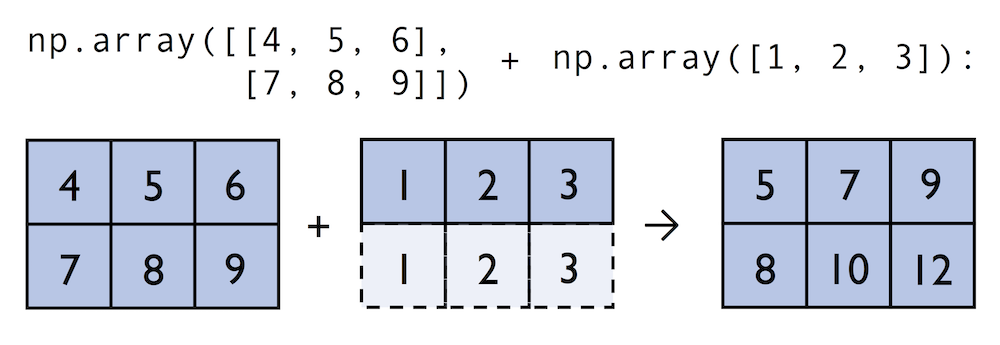
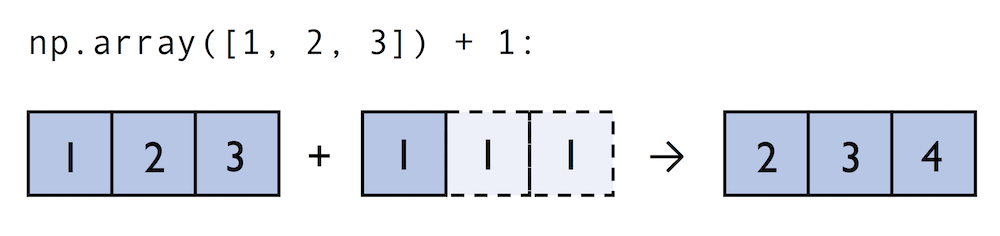
생성된 ndarray 형에는 +, -, x, / 같은 연산자들이 auro-broadcasting 되어 적용됨.

np.array().dtype

np.adarray()의 atribute로 저장된 하나하나의 dtype을 반환

np.array().astype()

np.adarray()의 dtype은 변환해주는 method.

np.array().ndim

np.adarray()의 dim 수를 반환하는 attribute

np.array().shape()

np.adarray()의 각 dim 별 사이즈를 반환(tuple).

Numpy Construction


np.zeros(shape=tuple, dtype = type)

입력 받은 tuple 정보로 차원에 맞춰 모든 셀이 0인 np.adarray() 반환

np.ones(shape=tuple, dtype = type)

입력 받은 tuple 정보로 차원에 맞춰 모든 셀이 1인 np.adarray() 반환

np.eye(N=int, M=int)

입력 받은 N, M 값을 바탕으로 identity matrix(diag=1, else=0)를 반환

np.diag(v:array-Like)

입력 받은 array-Like한 데이터를 diag-element로 가지는 matrix 반환.

np.arange(start=int, stop=int, step=int)

입력 받은 정보로 range에 맞춰 step 밟으며 리스트 생성.
stop 포함되기 전까지 generate
int-Like 한 정보 하나만 넣으면, stop으로 정의하고 start는 default로 0에서 출발.

np.linspace(start=int, stop=int, num=int)

입력 받은 정보로 range에 맞춰 num 만큼 등 간격으로 list generate.

Numpy Array Indexing


Indexing

np.ndarray 형은 형태로 indexing이 가능하다.
음수의 의미는 뒤에서부터 세었을 때의 순서이다.

Slicing

np.ndarray 형은 형태로 indexing이 가능하다.

  • ::-1(reverse)

neg Slicing

reverse를 하면서 slicing을 어떻게 사용할 수 있나?
ex) a = [1, 2, 3, 4, 5]
a[3:1:-1] = [4, 3]

  • reverse가 먼저 되고, 이후에 기존 index를 사용하면 되는데, 주의점은 start, end 순서가 뒤바뀜.

Numpy Array Math and Universal Functions


Universal Functions(ufuncs)

기본 제공하는 파이썬의 연산자들은 느리기 때문에 C로 미리 컴파일된 소스들을 활용할 수 있는 연산자들을 numpy에서 제공하고 있다. 이를 ufuncs라고 하고 기본적인 arithmetic operators를 포함한 60여개의 함수들을 지원하고 있다.

  • 2x3 matrix에서 모든 element를 1씩 증가시키고 싶을 때 할 수 있는 3가지 방법은

for-loop

lst = [[1,2,3], [4,5,6]]
for row_idx, row_val in enumerate(lst):
	for col_idx, col_val in enumerate(row_val):
		lst[orw_idx][col_idx] += 1
lst

List-Comprehension

lst = [[1,2,3], [4,5,6]]
[[cell + 1 for cell in row] for row in lst]

np.add()

ary = np.array([[1,2,3], [4,5,6]])
ary = np.add(ary, 1)
  • numpy는 기본 산술 연산자를 overloading하기 때문에, 는 그대로 사용하면 된다.

Additional Useful np unary functions

  • np.log(): natural logarithm
  • np.log10(): base-10 log
  • np.sqrt(): square root
  • np.mean(), np.std(): mean of ndarray
  • np.std(): standard deviation
  • np.var(): variance
  • np.sort(): ascending sort
  • np.argsort(): return indices of sorted array
  • np.min(), np.max() : min or max value of array
  • np.argmin(), np.argmax(): indices of min or max value of array
  • np.array_eqaul(): check if 2 arrays have same shape and entries

np.reduce(array-Like, axis=int)

axis를 따라서 하나의 수치가 나올 때까지 연산을 cumulative하게 진행.

  • tips!: ary1.sum(axis=0)는 np.add.reduce(ary, axis=0)

np.product(), np.sum()

이 둘은 axis 지정이 없으면 전체 entry들 다 연산한다!! 주의할 것!

Numpy Broadcasting


Broadcasting

  • matrix 연산 시 행렬 차원이 불일치 하지만, 맞춰줄 수 있을 때 사용되는 Method
  • implicit하게 작동하다보니, 주의해서 볼 것!

Numpy Advanced Indexing - Memory views and copies


deep copy() vs shallow copy

deep copy: copy as a value
shallow copy: copy as a pointer

Memory view in Numpy

ary = np.array([[1, 2, 3], [4, 5, 6]])
first_row = ary[0]
first_row += 99
[100, 101, 102]

여기서, 다시 기존 ary를 확인해보면,

ary
array([[100, 101, 102], [4, 5, 6]])

이 concept이 memory view이다. index로 가져온 것은 deep-copy 된 것이 아니라, shallow copy 된 것이다!
따라서, numpy 사용 시에는 “slicing creates view” 라는 것을 명심할 것.

View with Scalar

copy, slicing, indexing의 대상이 단일 scalar라면, view가 생성되는게 아니라, deep-copy가 된다.
또한 주의해야할 건 slicing이 view를 만드는거지, ufuncs는 deep-copy를 한다.

  • 만약 위와 같은 게 싫고 deep-copy가 필요하다면?

deep-copy()

ary = np.array([[1,2,3], [4,5,6]])
first_row = ary[0].copy()
first_row +=99

이렇게 되면,

first_row
array([100, 101, 102])
ary
array([[1,2,3], [4,5,6]])

np.shares_memory(a: array-Like, b: array-Like)

view로 만들어진 건지 아닌지 확인할 때 사용할 수 있다.
view라면 변수끼리 memory를 공유할테니, True

파이썬 “참조” vs C “포인터” 차이(개념 정리)

  • 파이썬 변수는 메모리 주소를 들고 다니는 포인터가 아니라, 객체를 가리키는 이름표에 가깝다.
  • 포인터 연산/산술, 주소 취득, 역참조 연산자 같은 저수준 기능은 없다.
  • 대신 가변 객체(list, dict, ndarray 등)의 메서드/슬라이스 대입이 “역참조 후 값 쓰기”에 해당하는 행동을 수행한다.
  • 불변 객체(int, str, tuple 등)는 제자리 변경 자체가 불가능하므로, x += 1 같은 문법이 실제로는 새 객체를 만들어 재바인딩한다. (ndarray는 가변)

exercise

a = np.array([0, 1, 2, 3, 4])
b = a[:]
print(np.shares_memory(a, b) 
# index을 해서 b를 만들었으므로, b는 a의 memory view이다.
# 따라서 memory를 공유하니, True
 
a = np.array([0, -1, -2, -3, -4])
print(b)
# a가 재할당 되었고, b는 변동이 없으므로 기존에 가리키던 array를 그대로 pointing.
# 따라서 b는 [0 1 2 3 4]
 
print(np.shares_memory(a, b))
# a, b가 가리키는게 다르니 False
 
a = np.array([0, 1, 2, 3, 4])
b = a[:]
# 현재는 a 재할당, b는 a의 memory view이니 동일한 메모리를 가리킨다.
 
# assigning an array to a *view* of `a`
# causes NumPy to update the data in-place
a[:] = np.array([0, -1, -2, -3, -4])
print(a)
 
# `b` a view of the same data, thus
# it is affected by this in-place assignment
print(b)
print(np.shares_memory(a, b))

Fancy Indexing


Fancy Indexing

non-continuous sequence를 indexing 할 수 있다.
문법은 아래와 같이,

ary = np.array([[1,2,3], [4,5,6]])
ary[:, [0,2]]
array([[1, 3], [4, 6]])

기존 indexing에서 범위를 지정하던 문법 대신 bracket 안에 이산적인 범위를 작성해주면 됨.

  • return 은 무조건 deep-copy된 값임을 명심!

Boolean Masks for Indexing


Boolean Masks for Indexing

True, False 값만 가지는 boolean array를 사용하여 indexing 하는 방법.
  • pandas의 DataFrame도 지원하는 그것.
  • condition을 chain처럼 묶을 때에는 &(and), |(or)

Example

ary = np.array([[1,2,3], [4,5,6]])
grater3_mask = ary > 3
greater3
array([[False, Fasle, True], [True, True, True]])

이를 사용해서,

ary[greater3_mask]
array([4,5,6])

Considered as a Fancy Indexing

boolean mask가 사용된 Indexing도 fancy indexing으로 취급됨을 주의!

  • 이해하기는 쉬운게, 모든 ENTRY에 대해 정의되니까, 그걸 사용한 걸로 생각하면 됨.

Random Number Generator


Random Number Generator

ML, DL에서 random number 생성할 일이 많은데, 이에 관한 내용.

Random Seed

우리가 결국 생성하는 수들은 완전히 random 한게 아닌, pseudo-random인데, 재현을 위해 seed 값을 설정해두고 사용하는게 일반적.

random

np.random.seed(133)
np.random.rand(3)
[0.232454, 0.25234452, 0.764575]

위의 함수는 범위의 난수를 return

RandomState

reproducible한지는 굉장히 중요하기 때문에 일반적으로 연구 시에는 이를 고정하지만, 간혹 여러 random-state가 필요할 때가 있다. 그럴 때는 아래와 같이,

rng = np.random.RandomState(seed=123)
rng.rand(num=3)

와 같이 State를 정의한 후 사용.

Reshaping Numpy Arrays


ndarray.reshape()

reshape() method는 ndarray 자료의 차원을 변환해주는 method이다.
다만, return하는 값은 새로 만들어진 값이 아닌, memory view이기 때문에

ary1d = np.array([1, 2, 3, 4, 5, 6])
ary2d = ary1d.reshape(2, 3)
np.may_share_memory(ary1d, ary2d)
True

reshape placeholder: -1

reshape method를 사용할 때, 원하는 차원의 값들만 기입해주고 나머지는 -1로 채우면 알아서 채워준다.

ary1d.reshape(-1, 2)
array([[1,2],
	    [3,4], 
		[5,6]
		])

ndarray.flatten() vs ndarray.ravel()

두 method 모두 ndarray 자료의 차원을 1로 변형해준다.(편다)
다만, return하는 값은

  • flatten()의 경우, copy된 새 array
  • ravel()의 경우, memory view이다.
    • ary.reshape(-1)은 ravel()과 완전히 동일하게 memory view 반환.

np.concatenate(ary1, ary2, axis = int)

axis 따라서 array 2개를 concat.

ary = np.array([[1, 2, 3]])
np.concatenate((ary, ary), axis=0)
array([[1, 2, 3], [1, 2, 3]])
ary = np.array([[1, 2, 3]])
np.concatenate((ary, ary), axis=1)
array([[1, 2, 3, 1, 2, 3]])

Numpy Comparison Operators and Masks


Boolean Operator

ndarray에 bool 연산을 걸면, bool 값들을 entry로 가지는 array가 생성된다.

Boolean operator

ary = np.array([1,2,3,4,5])
mask = ary > 2
mask
array([False, False, True, True, True])

그래서 이 masK를 아래와 같이 사용한다.

ary[mask]
array([3, 4, 5])

이를 이용해서 **mask의 sum()**을 하면, masking한 array의 entry 수를 알 수 있겠지.

np.where(condition, True-value, False-Value)

condition에 따라 true, false 로 설정된 값들을 entry로 가지는 array를 return

Bit-wise Operator

bit-wise 연산자를 사용해서 indexing도 가능하니 잘 활용하면 좋다.

ary[~mask]
[1, 2]
  • AND(&), OR(|), XOR(^), NOT(~) 등이 지원된다.

Linear Algebra with Numpy


Axis, row-vector, column-vector

그냥 1d array는 row-vector이니,

row_vector = np.array([1,2,3])
row_vector
array([1,2,3])

column-vector는 다음과 같이 선언할 수 있는데,

column-vector = np.array([1,2,3]).reshape(-1, 1)
column-vector
array([[1], 
	   [2], 
	   [3]])

이것보다 편하게 axis를 추가하는 방법은

row_vector[:, np.newaxis]

하면 column-vector가 동일하게 2d로 만들어 진다.
np.newaxis 대신 None을 넣어도 동일하다.
세 방식 모두 memory view를 만든다는 것을 기억하자!

np.matmul()

같은 연산의 경우, 자동으로 broadcasting이 되어, 완전히 차원이 맞지 않아도 알아서 처리해준다.
row_vec : (3, ), col_vec: (3,1), matrix: (2,3) 일 때,

  • matmul(matrix, row_vec) (2, )
  • matmul(matrix, col_vec) (2, 1)
  • matmul(row_vec, row_vec) ()

np.dot()

pair of 2d or 1d array 에서 matmul 연산을 할 때, 좀 더 빠른 연산을 구현해놓은 method()

  • numpy는 공식적으로 큰 행렬에 대해서는 @ 혹은 np.matmul을 권장한다.

np.transpose()

전치 행렬 연산.

  • 짧게는 matrix.T로 사용한다.

추가적인 linear-algebra function이 필요하다면, numpy.linalg or scipy.linalg를 참조할 것.

Numpy Matrix

numpy에서 제공하는 특별한 type의 matrix인데, 2d로 dimension이 강제되어 있고 연산자가 element-wise product로 정의되어 있다.

Matplotlib


IPython Magic Command Line

%matplotlib inline

matplotlib를 사용한 그래픽스를 ipynb에서 inline형식으로 삽입해서 보여주겠다는 의미.