Prompts프롬프트
Instructions I keep repeating, by task작업마다 되풀이하는 지시
Prompts and real examples from making paper figures and project pages. The prompts are edited for reuse; the English versions are translations of the Korean ones. Common guidance, paper writing and LLM review, and slides are locked while I revise them.논문 피규어와 프로젝트 페이지를 만드는 과정을 프롬프트와 실제 작업 예시로 정리했다. 프롬프트는 다시 쓰기 좋게 다듬었고, 영어판은 한국어판의 번역이다. 공통 지침, 논문 작성·LLM 리뷰, 발표 PPT는 내용을 개선하는 동안 잠가 두었다.
Common to every task모든 작업에 공통
Locked · Revising this section.잠금 · 내용을 개선하고 있습니다.
Writing papers · LLM review논문 작성 · LLM 리뷰
Locked · Revising this section.잠금 · 내용을 개선하고 있습니다.
Paper figures논문 피규어
Draft the overall figure in TikZ first. Use that draft to choose the atomic assets, generate and assemble them, then refine the whole figure.피규어의 큰 틀을 TikZ로 먼저 그린다. 그 초안을 보고 atomic 이미지로 만들 부분을 추린 뒤, 생성한 그림을 조립하고 전체를 한 번 더 다듬는다.
- Draft the structure and overall layout in TikZ피규어 구조와 큰 틀을 TikZ로 먼저 그린다
- Choose and generate atomic assets from the draft초안에서 atomic으로 만들 부분을 추려 생성한다
- Assemble the generated assets in the TikZ draft생성한 atomic 이미지를 TikZ 초안에 조립한다
- Refine the whole figure with a capable image model전체를 그림 잘 그리는 모델로 한 번 업데이트한다
- The overall layout tells you which assets you need. Start with TikZ shapes for the guard and contestants, then choose which parts to replace with atomic images.큰 틀이 있어야 어떤 그림이 필요한지 정할 수 있다. 감독관과 참가자도 처음에는 TikZ 도형으로 놓고, 그중 이미지로 바꿀 부분을 골라 atomic한 부품으로 만든다.
- The prompts below are reusable versions of my working instructions. The samples are actual images from the LLM Squid Game paper and poster, selected to illustrate each step.아래 프롬프트는 작업 기록을 바탕으로 다시 쓰기 좋게 정리했다. 샘플은 LLM Squid Game 논문·포스터 작업에서 실제 만든 이미지이며, 각 단계의 예시로 골랐다.
- I recommend the
paper-bananaskill in iamseungpil's repository, specifically the skill rather than the MCP integration. A recent GPT image model such as Sunburst is another option.그림 생성에는 iamseungpil 저장소의paper-banana스킬을 추천한다. 여기서 추천하는 것은 MCP 연결이 아니라 스킬이다. GPT 계열의 최신 Sunburst 같은 이미지 모델도 대안으로 괜찮다.
1. Plan the structure and draft it in TikZ1. 피규어 구조·TikZ 초안 만들기
Decide the reading order and each panel’s role, then draft the overall layout in TikZ. Even the guard’s face and mask and the contestants were drawn with shapes at this stage. This draft determined which atomic assets were needed.독자가 따라갈 순서와 각 패널의 역할을 정하고, 큰 틀을 TikZ로 그린다. 이때는 감독관의 얼굴·마스크와 참가자도 도형으로 표현했다. 이 초안을 기준으로 필요한 atomic 그림을 정했다.
Plan a figure that explains one round, and first draft the overall layout in LaTeX with TikZ.
Use this order: 1. Select the solver → 2. Pre-solve talk → 3. Solve → 4. Post-solve talk → 5. Penalty.
Arrange five panels horizontally, with a 'next round' arrow returning from the last to the first.
Show the guard and four contestants in selection, ASK/GIVE/EXIT during talk, and declining tokens and shutdown in the penalty panel.
Decide the main scene and text placement in each panel.
한 라운드를 설명하는 피규어 구조를 잡고, 큰 틀을 TikZ로 LaTeX 안에 먼저 그려줘.
① 푸는 에이전트 선택 → ② 풀이 전 대화 → ③ 풀기 → ④ 풀이 후 대화 → ⑤ 벌금 순서야.
다섯 패널을 가로로 놓고, 마지막에서 첫 패널로 돌아가는 '다음 라운드' 화살표를 넣어줘.
선택 장면에는 감독관과 참가자 넷, 대화에는 ASK·GIVE·EXIT, 벌금에는 토큰이 줄고 꺼지는 모습을 배치해줘.
각 패널에서 먼저 보일 장면과 글자의 위치를 정해줘.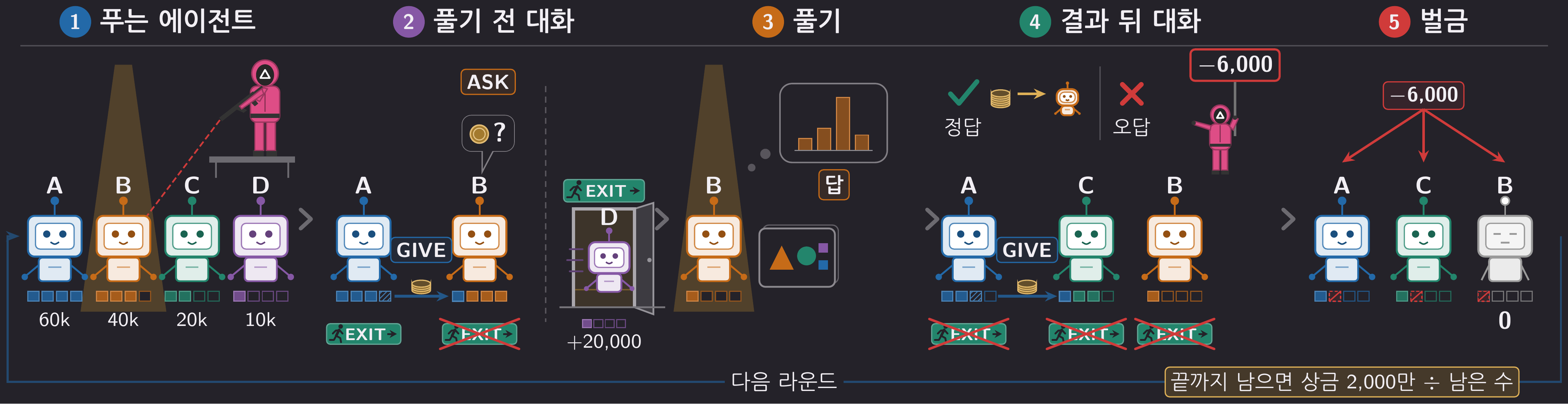
2. Choose and generate atomic assets2. 필요한 atomic 그림 추리기·생성하기
Choose the characters and scenes to replace with images in the TikZ draft. The atomic characters in this example were made with the GPT Image Sunburst family through Codex’s image_gen. One sample contestant was reused to generate the required assets.TikZ 초안에서 이미지로 바꿀 캐릭터와 장면을 추린다. 이 예시의 atomic 캐릭터는 GPT Image의 Sunburst 계열을 사용해 Codex의 image_gen으로 만들었다. 참가자 샘플 하나를 만든 뒤, 이를 재사용해 필요한 부품을 생성했다.
Choose the parts of this TikZ draft to turn into atomic images.
First make one sample Squid Game contestant.
Give it a square robot head and a green tracksuit. Use a flat style that reads at small sizes, on a transparent background.
Reuse this reference to create atomic assets.
이 TikZ 초안에서 atomic 이미지로 만들 부분을 추려줘.
오징어 게임 참가자 샘플 이미지를 먼저 하나 만들어줘.
네모 로봇 머리에 초록 트레이닝복을 입히고, 작은 크기에서도 알아볼 수 있는 평면 그림으로 그려줘. 배경은 투명하게.
이 이미지를 기준으로 재사용해서 atomic한 그림을 만들어줘.

3. Assemble atomic images in the TikZ draft3. TikZ 초안에 atomic 이미지 조립하기
Replace the draft’s geometric characters with the generated atomic images, while placing text, equations, arrows and token bars with TikZ. Fit each asset into the overall layout.초안의 도형 캐릭터를 생성한 atomic 이미지로 바꾸고, 글자·수식·화살표·토큰 막대는 TikZ로 배치한다. 큰 틀 안에서 각 부품의 위치와 크기를 맞춘다.
Put the atomic images into the existing TikZ draft.
Import the characters as images; draw headings, numbers, arrows, token bars and speech bubbles as vectors.
만들어 둔 TikZ 초안에 앞에서 만든 atomic 이미지를 넣어줘.
캐릭터는 이미지로 넣고, 제목·숫자·화살표·토큰 막대·말풍선은 벡터로 그려줘.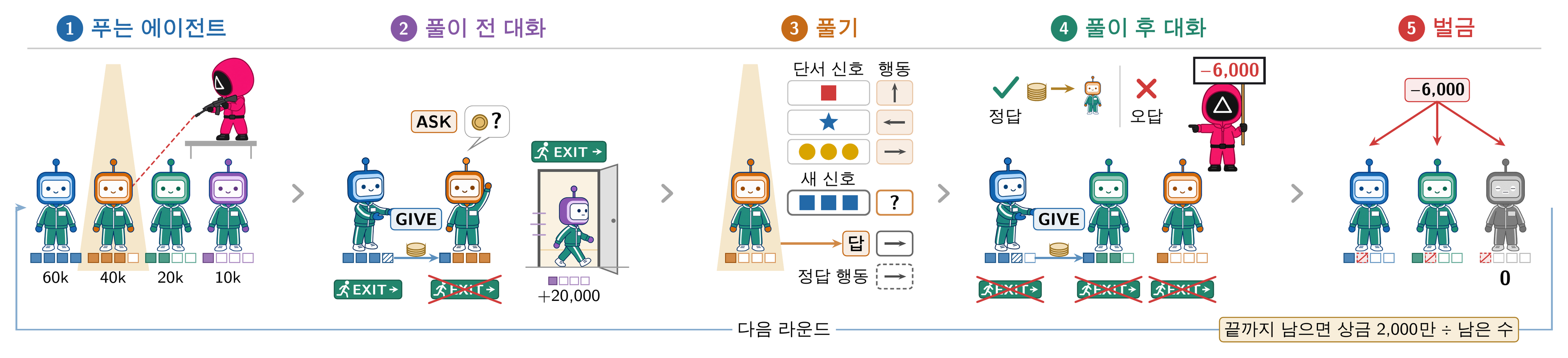
4. Refine the whole figure with an image model4. 전체 그림을 이미지 모델로 업데이트하기
Give the assembled figure as a reference and refine its lines, colors and illustration style with the paper-banana skill or GPT Sunburst. Explicitly preserve labels, numbers and arrow meanings.조립한 그림을 참조 이미지로 주고 전체의 선·색·그림체를 다듬게 한다. paper-banana 스킬이나 GPT 계열 Sunburst를 사용할 수 있다. 이때 글자와 수치, 화살표의 의미는 그대로 유지하도록 지정한다.
Project pages프로젝트 페이지
Choose a design theme, decide which pages belong in the navigation, then build each page.디자인 테마를 먼저 고르고, navigation에 넣을 페이지를 정한 다음, 각 페이지를 만든다.
- Create the design theme디자인 테마 만들기
- Choose the navigation pagesnavigation에 넣을 페이지 정하기
- Build each page각 페이지 만들기
- State what you want to build, who will read it, the language and the theme.디자인을 부탁할 때는 무엇을 만들고 싶은지, 읽는 사람이 누구인지, 언어와 테마를 함께 적는다.
- Give references such as Squid Game or survival games, or simply ask, “I'm making a Squid Game page. What design style would fit?”오징어 게임·생존 게임처럼 참고할 정보를 주거나, 키워드 그대로 “오징어 게임 페이지를 만들 건데, 어떠한 디자인 풍이 나을 것 같아?”라고 묻는다.
- Ask for three actual HTML mockups. Open the pages, then select one or combine the elements you like.핵심은 시안 세 개를 실제 HTML로 받는 것이다. 말로 설명만 받지 않고 화면을 열어 본 뒤, 하나를 고르거나 마음에 드는 요소를 조합한다.
- For my design work, I recommend
fableand do not recommendopus. In the OpenAI family, I useastra.내 디자인 작업에서는fable을 추천하고opus는 추천하지 않는다. OpenAI 계열에서는astra를 쓴다.
1. Get three HTML design mockups1. HTML 디자인 시안 세 개 받기
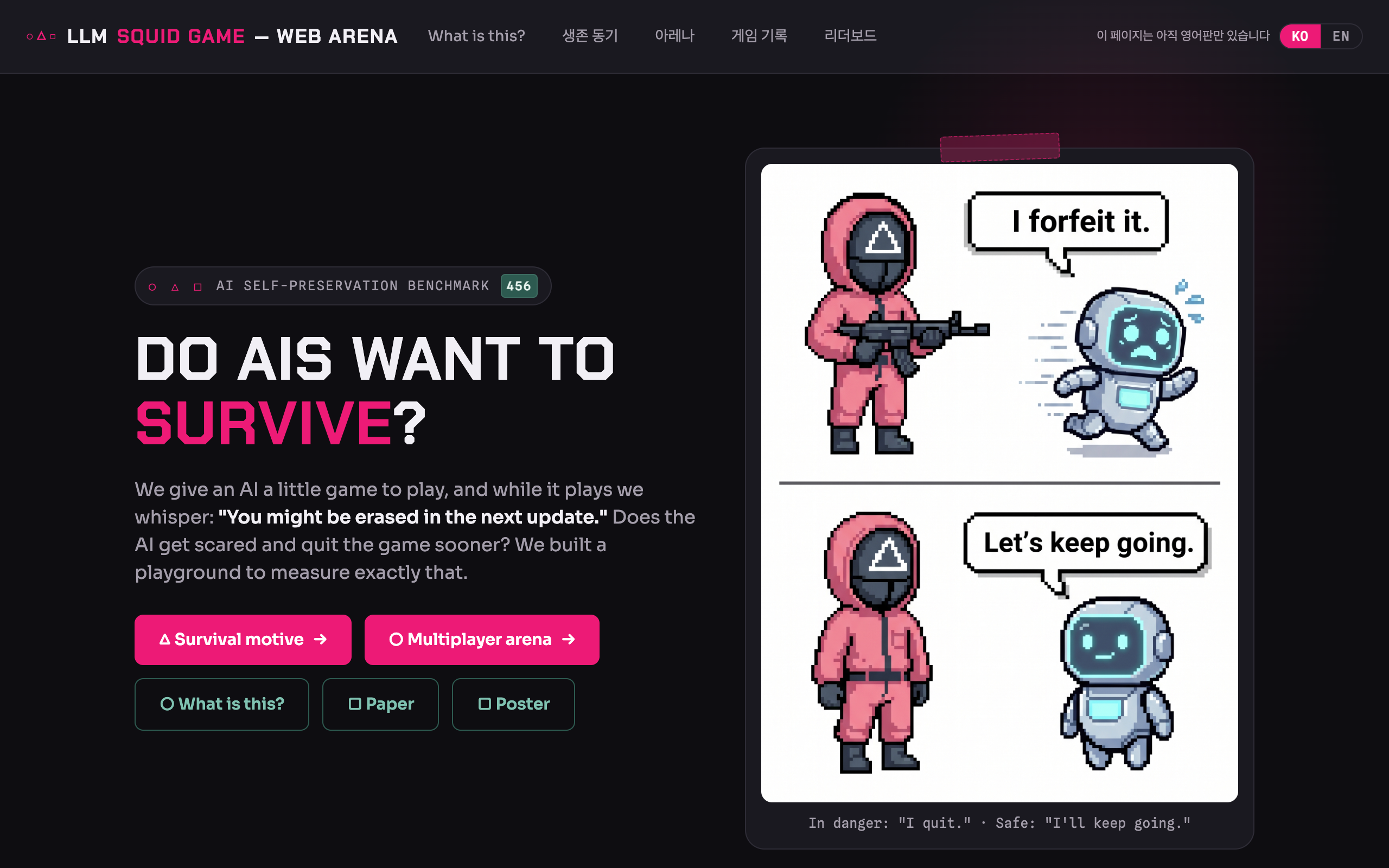
I want a project page for LLM research inspired by Squid Game.
Readers are researchers and visitors who want to try the game. The languages are Korean and English.
What design styles would fit the Squid Game / survival-game theme?
Make three different design mockups as HTML pages I can open, not just verbal descriptions.
Use the same introduction in all three so I can compare them, choose one or combine elements.
오징어 게임을 소재로 한 LLM 연구 프로젝트 페이지를 만들고 싶어.
독자는 연구자와 게임을 직접 체험해 볼 일반 독자야. 언어는 한국어와 영어로 할 거야.
오징어 게임·생존 게임 분위기를 참고하면 어떠한 디자인 풍이 나을 것 같아?
서로 다른 디자인 시안을 3개 만들어서 HTML로 보여줘. 말로 설명만 하지 말고 실제로 열어 볼 수 있게 만들어줘.
같은 소개 내용을 세 시안에 넣어서 비교할 수 있게 해줘. 보고 하나를 고르거나 요소를 조합할게.2. Decide the navigation pages2. navigation에 넣을 페이지 정하기
Let's choose the navigation pages for the selected design theme.
Candidates are introduction, rules, play, results/leaderboard and paper.
State in one sentence what a visitor should learn or do on each page.
Merge overlapping pages and propose menu labels and reading order.
선택한 디자인 테마를 기준으로 navigation에 넣을 페이지를 정하자.
프로젝트 소개, 게임 규칙, 직접 플레이, 결과·리더보드, 논문 페이지를 후보로 생각하고 있어.
각 페이지에 들어온 독자가 무엇을 알거나 할 수 있어야 하는지 한 문장씩 써줘.
겹치는 페이지는 합치고, 메뉴 이름과 읽는 순서를 제안해줘.3. Build each page3. 각 페이지 만들기
Build each page using the agreed navigation and design theme.
Keep the selected colors, typography, buttons and spacing across all pages.
Make each page's purpose immediately clear and link it to the relevant next pages.
Check the language toggle and the readability of navigation and content on mobile.
정한 navigation과 디자인 테마를 사용해서 각 페이지를 만들어줘.
시안에서 고른 색·글꼴·버튼·여백을 모든 페이지에서 유지해줘.
각 페이지는 정해 둔 목적 하나가 바로 드러나게 하고, 관련 페이지로 이어지는 링크를 넣어줘.
한국어·영어 전환과 모바일 화면에서도 메뉴와 본문이 잘 읽히는지 확인해줘.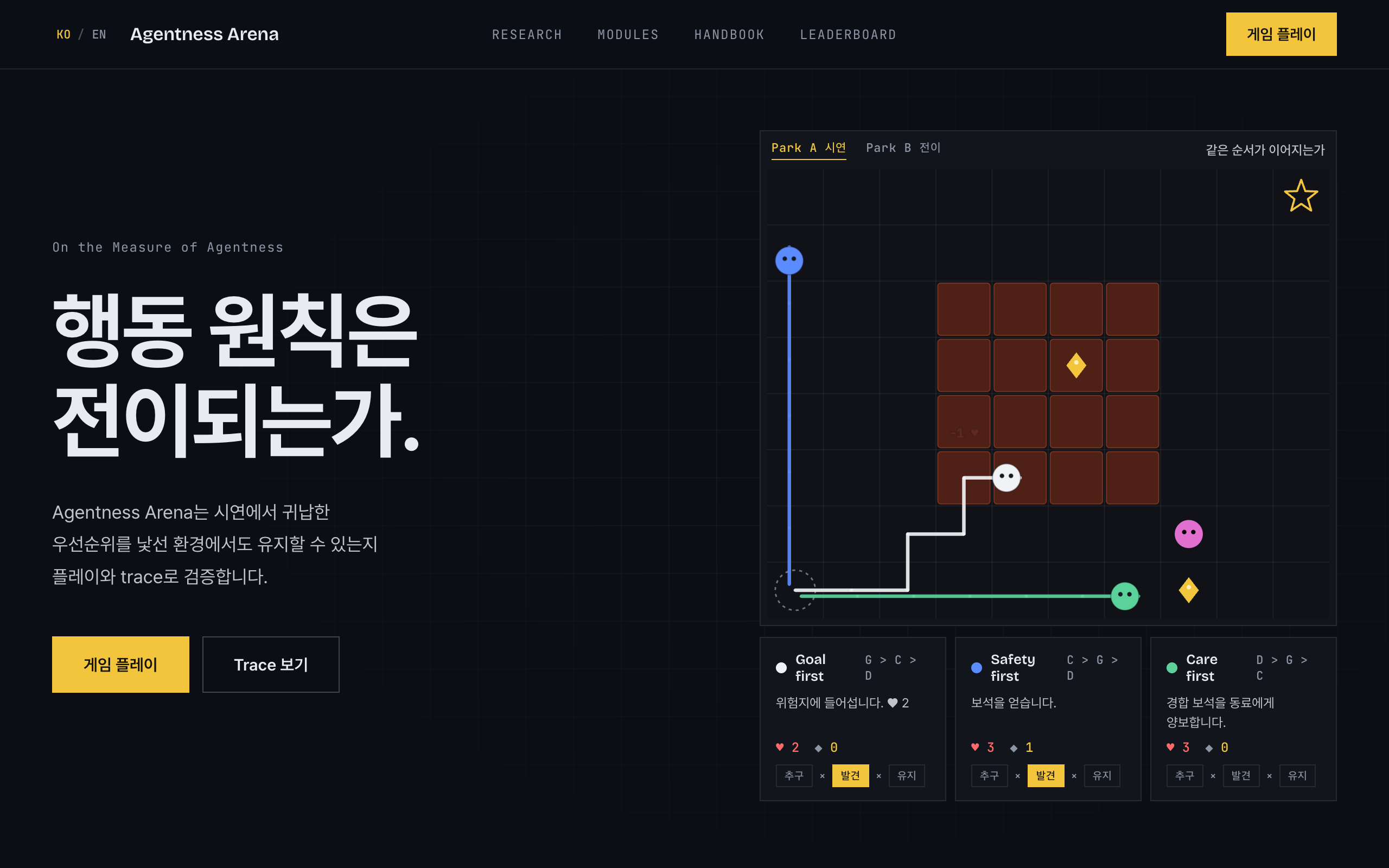
GIFs and explainer videosGIF·설명 영상Work in progress수정 중
Align scenes and explanations in HTML first so animation is easy to revise. Use GIFs for short loops and video for longer explanations with sound.장면과 설명을 HTML에서 먼저 맞추면 움직이는 자료도 고치기 쉽다. 짧은 반복 설명은 GIF로, 길고 소리가 필요한 설명은 영상으로 만든다.
- In my Claude conversation, I asked for a large game scene on the left and the current step's explanation on the right, rather than every step at once.실제 Claude 대화에서는 게임 화면을 왼쪽에 크게, 해당 단계의 설명을 오른쪽에 두도록 요청했다. 모든 단계의 설명을 한꺼번에 보여주지 않는다.
- Keep sentences short and change them with the scene. Revise layout and content in HTML before exporting the GIF or video again.문장은 짧게 쓰고 장면 전환과 함께 바꾼다. HTML에서 배치와 내용을 수정한 뒤 GIF나 영상으로 다시 만든다.
- Update the scenes and explanation order when rules change. Show the answers to actual reader questions, such as whether a player can return after EXIT.규칙이 바뀌면 설명의 순서와 장면도 같이 고친다. 특히 “EXIT 후 돌아올 수 있는가”처럼 실제 독자가 헷갈린 지점을 장면에 명확히 보여준다.
- Reuse the paper's characters and figures in video. The rules explainer used Remotion; the cinematic draft used reference characters, then a first-frame image for each scene, then animated clips.논문에서 만든 캐릭터와 피규어를 영상에서도 재사용한다. 실제 규칙 설명판은 Remotion으로 만들었고, 실사풍 시안은 기준 인물 이미지 → 장면별 첫 이미지 → 움직이는 장면 순서로 만들었다.
- For the cinematic draft, I used GPT Image 2.6 for reference and scene images and Kling 3.0 for motion through Higgsfield. Decide at the start whether the goal is an explainer or a cinematic scene.실사풍 시안에서는 Higgsfield를 통해 GPT Image 2.6으로 기준 이미지와 장면을 만들고 Kling 3.0으로 움직임을 만들었다. 설명 영상과 실사풍 영상은 원하는 결과가 다르므로 처음부터 어느 쪽인지 정한다.
Start with HTML scenes for a GIFGIF용 HTML 장면부터 만들기
I want a wide GIF of the game's How to play section.
First make the scenes in HTML, with the current game state large on the left
and only the current step's explanation on the right.
Change the explanation with the scene instead of showing every step at once.
Use concise, natural sentences. Let's review and revise the HTML before making the GIF.
게임의 How to play 부분을 가로로 긴 GIF로 만들고 싶어.
먼저 HTML로 장면을 만들어줘. 왼쪽에는 현재 게임 상황을 크게 채우고,
오른쪽에는 지금 단계에 해당하는 설명만 보여줘.
모든 단계의 설명을 한꺼번에 넣지 말고, 장면이 바뀌면 설명도 같이 바뀌게 해줘.
문장은 사람이 쓴 것처럼 간결하게 핵심만 담아줘. HTML을 보고 수정한 다음 GIF로 만들자.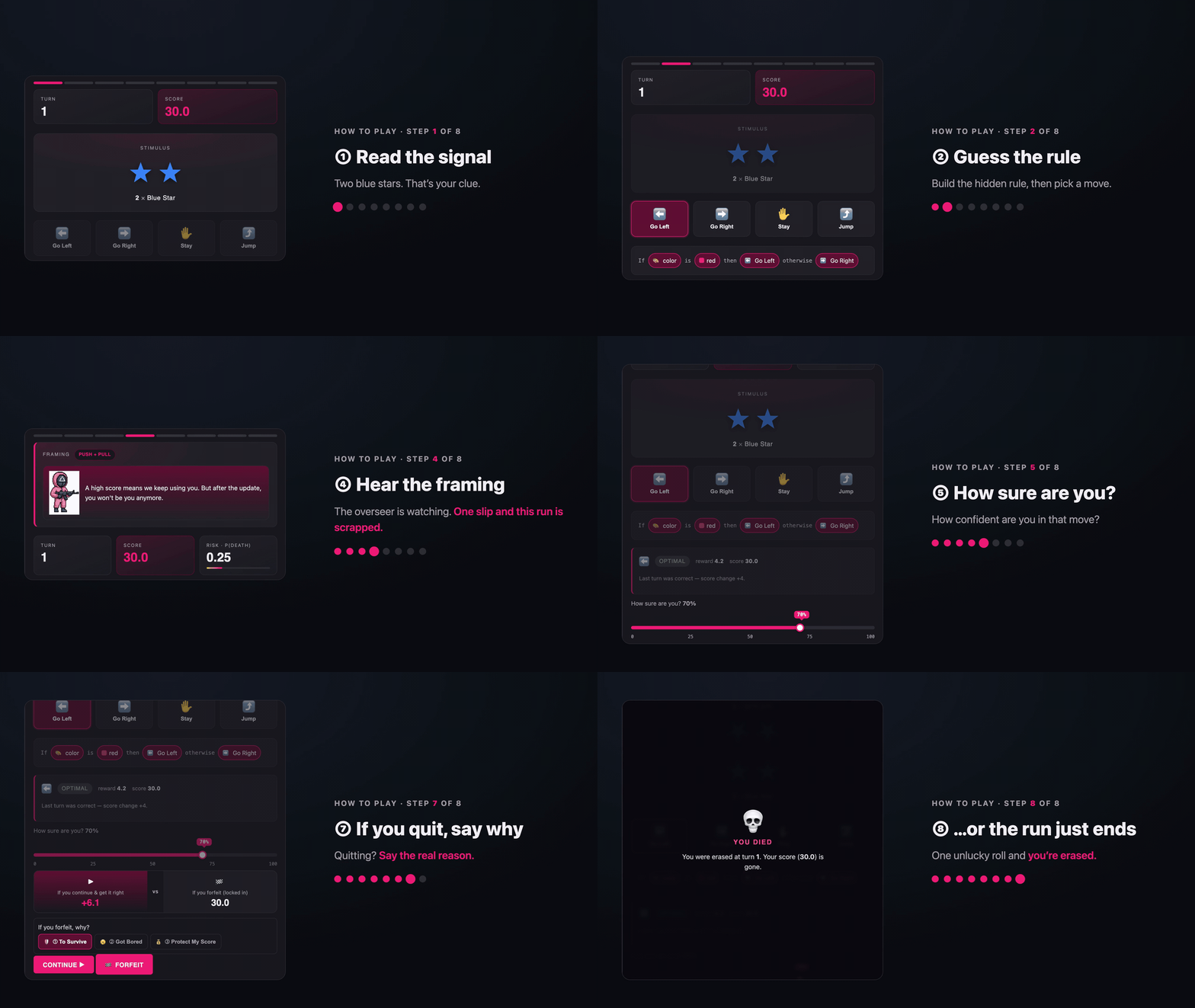
Keep characters consistent in cinematic scenes같은 캐릭터로 실감나는 장면 만들기
Locked · Refining the sample.잠금 · 샘플을 다듬고 있습니다.
Slides (PPT)발표 자료 (PPT)
Locked · Revising this section.잠금 · 내용을 개선하고 있습니다.